Your one-stop shop for JUCE modules, tools, assets and resources
Groove Box Software to create Music. Start with Clips Scenes to songs.
This is Source code for the GroovixBeat Groove box (BETA) . This was written in the JUCE framework with a lot of help from AI.
It uses a similar workflow to Korg Gadget IPad App. You create clips with Samples, Midi + VSTs or Midi + Sampled Instruments and sequence them into scenes and songs. There is also a live perfromance mode to trigger clips. The UI is in HTML CSS and JS and the time critical tasks like Sequencing and audio processing is done in the JUCE backend.
This was an app I wanted personally, and wanted to test the limits of AI assisted coding. It took about a Month and over 450 interactive Prompts over dozens of sessions. It also involved manual coding and debugging when it got stuck in loops and to get it working exactly as I wanted, but all in all happy with the outcome.
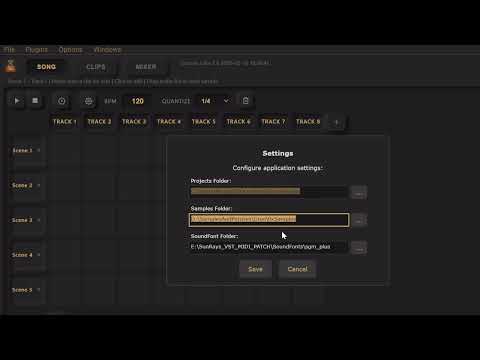


GroovixBeat.zip file has the Window binary if you want to quickly give it a test run.
GroovixBeatJS folder contains the HTML+CSS+JS Ui for the app. GrooviXBeat has the Juice C++ App.
You need Juce framework to build this. Open the GrooviXBeat.jucer in Projucer and create the Visual Studio Code Project open it build and run.
For Debug and Testing Edit \GrooviXBeat\Source\UI\SequencerComponent.cpp to point to the place where you have the HTML UI GroovixBeatJS Files.
LOCAL_WWW_ROOT "D:/Ganesh/GrooviXBeat/GroovixBeatJS/"
For Release Builds You can zip up the GroovixBeatJS and use PROJUCER to create the binary CPP to be directly included in the EXE.
GrooviXBeat is a powerful desktop groovebox and digital audio workstation (DAW) that brings the immediacy of hardware music production into a modern software environment. Built with a JUCE C++ audio engine and a responsive browser-based UI, GrooviXBeat combines the clip-launching workflow of Ableton Live with the hands-on simplicity of classic groove machines.
Clip-Based Workflow At its core, GrooviXBeat organizes music into an 8x8 grid of clips arranged by scenes (rows) and tracks (columns). Each clip contains either MIDI note data or audio samples, giving producers the flexibility to mix programmed patterns with recorded audio. Scenes can be triggered individually or played sequentially in Song Mode for full arrangement playback. The grid is fully expandable — add as many tracks and scenes as your project demands.
Piano Roll Editor The built-in piano roll provides a precise note editing environment spanning four octaves (C2–C6). Click to place notes, drag to move or extend them, and right-click to delete. Per-note automation supports pitch bend, modulation, pan, and VST parameter control, giving you deep expression without leaving the grid. Copy, paste, and duplicate operations make pattern creation fast and intuitive.
Sample Editor GrooviXBeat includes a full waveform editor for audio clips. Load any audio file, then trim, cut, silence, fade, normalize, or reverse it directly within the app. Sample offset adjustment lets you align audio precisely to the grid, while loop settings ensure seamless playback. Edited samples are saved alongside your project for complete portability.
VST3 Plugin Support Load any VST3 instrument or effect plugin directly into your tracks. GrooviXBeat's audio graph routes MIDI from the sequencer through your chosen instruments with sample-accurate timing. A dedicated VST selector with search and filtering makes finding the right plugin effortless. Full VST parameter automation lets you control any plugin parameter directly from your note data.
Live Performance Mode Trigger clips in real time with quantized launching — clips snap to the beat for tight, on-the-fly performances. Queue clips while others play, trigger entire scenes, and build arrangements live. Visual feedback shows queued, playing, and stopped states at a glance.
Built-In Music Tools GrooviXBeat comes loaded with creative tools: chord generators, arpeggiators, drum pattern presets, melody generators, and music notation parsers. Import MIDI files to build on existing ideas or generate fresh patterns from scratch. A built-in SoundFont sampler instrument provides instant access to hundreds of sounds without external plugins.
Per-Track Mixer Every track features volume, pan, mute, and solo controls with real-time level metering. The mixer integrates directly with the audio engine for zero-latency monitoring. Scene properties include repeat count, time signature, and fade controls for polished arrangements.
Project Management Save and load complete projects including all clip data, plugin states, mixer settings, sample edits, and instrument assignments. GrooviXBeat preserves your entire session exactly as you left it.
https://juce.com/ https://docs.abcjs.net/
The Non JUCE (HTML JS etc.) code here is MIT Licenced. Please refer to JUCE Licence for their Licence terms https://juce.com/get-juce/
This product has no tags.
Something wrong with this product?
ReportAre you the owner of this product?
Request Ownership
